programming

Simple ordinal date queries in Swift

That happy moment when the API you need already exists

Ronald Martin

4 minute read

I had a very specific question a while ago:

When is the next 5th Sunday of the month?

That is, what is the next date which is not only a Sunday, but also the 5th occurrance of Sunday in its enclosing month?

This only occurs a handful of times in any given year (in the Gregorian calendar): an average of 30 days per month means 30 days/month / 7 days/week = ~4.29 weeks/month. For there, since each weekday occurs exactly once per week, this then implies that most weekdays will occur 4.29 times on average per month as well. That little fractional part adds up though, so periodically the calendar will line up such that the “Fifth Sunday” does occur.

I have a recurring appointment on 5th Sundays of the month, but at the time I started scheduling them, couldn’t find a good way of knowing when to set reminders. I could leaf through a calendar and look for all the fifth Sundays, I guess. But I write code for fun and profit, so I can automate this, right?

Building a date query

I sketched out a rough, brute force plan in my head. Loop through months in a calendar, maybe then loop through each Sunday, returning the date if the Sunday was a fifth occurrence. Not the worst thing in the world. But then I looked at the Foundation Date API to refine the idea and stumbled upon the obscure weekdayOrdinal property on NSDateComponents:

Declaration

var weekdayOrdinal: Int { get set }

Discussion

Weekday ordinal units represent the position of the weekday within the next larger calendar unit, such as the month. For example, 2 is the weekday ordinal unit for the second Friday of the month.

💡💡💡 “Oh, that’s exactly what I need!”

We just need to combine this with one of the newer NSCalendar functions added in iOS 8 to compute the actual answer we want:

import Foundation

let now = Date()

var components = DateComponents()
components.weekday = 1          // 1 == Sunday
components.weekdayOrdinal = 5   // 5th occurrence of this weekday

let calendar = Calendar(identifier: .gregorian)
let next5thSunday = calendar.nextDate(after: now, matching: components, matchingPolicy: .strict)

print(next5thSunday)
// "Jul 30, 2017, 12:00 AM"

And that’s it! Thanks, Foundation engineers!

Extending past one date

Knowing the next date is useful and answered my original question, but isn’t quite enough for all use cases. If you need to query the calendar for multiple dates, iOS 8 also introduced the NSCalendar function enumerateDates(startingAfter:matching:options:using:) that calls a closure you provide with each successive query result (synchronously!). The function params are as follows:

  • startingAfter start: Date - as described by the label, the date at which to start querying the calendar
  • matching components: DateComponents - the constraints on the query, e.g. for us, ‘5th Sundays’
  • matchingPolicy: Calendar.MatchingPolicy - the strategy to use when encountering ambiguous matches, e.g. due to Daylight Saving Time. Possible values can be found here.
  • using block: (Date?, Bool, inout Bool) -> Void - the closure that will be called with each matching query result. It takes three params: the first is the matching date, the second is a Bool describing whether this is an exact match to your components (whether or not this is relevant depends on your matchingPolicy), and finally, another Bool flag you can use to stop searching for more dates.

You use it like this:

// Find all the fifth Sundays up through the end of next year (2018).
calendar.enumerateDates(startingAfter: now,
                        matching: components,
                        matchingPolicy: .strict) { 
    date, isExactMatch, shouldStop in
    // I'm only interested in continuing with exact date matches
    guard let date = date, isExactMatch else { return }

    if calendar.component(.year, from: date) <= 2018 {
        print("\(date) is a fifth Sunday")
    } else {
        // Just set the `stop` flag when you're ready to stop the enumeration.
        shouldStop = true
    }
}
print("All done!")

// Prints:
"2017-07-30 07:00:00 +0000 is a fifth Sunday"
"2017-10-29 07:00:00 +0000 is a fifth Sunday"
"2017-12-31 08:00:00 +0000 is a fifth Sunday"
"2018-04-29 07:00:00 +0000 is a fifth Sunday"
"2018-07-29 07:00:00 +0000 is a fifth Sunday"
"2018-09-30 07:00:00 +0000 is a fifth Sunday"
"2018-12-30 08:00:00 +0000 is a fifth Sunday"
"All done!"

Sweet!

I have since discovered that Google Calendar now has the ability to create events that recur in this pattern, but now we know how to build something similar ourselves. :)

My First Android Library, Part I

What I learned from building a custom widget

Ronald Martin

6 minute read

Feature image

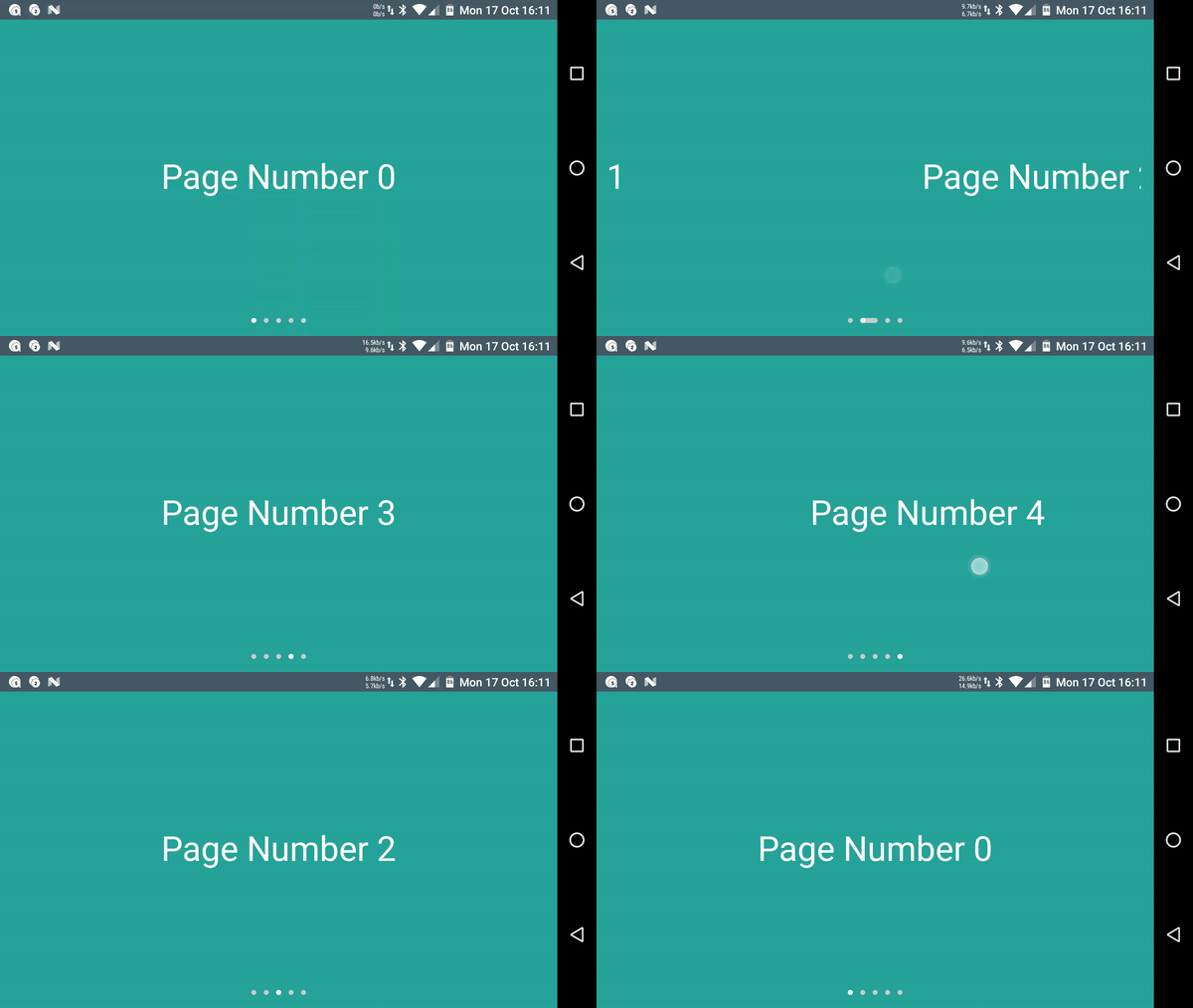
I built a software library recently. It’s a page indicator for mobile apps; the kind you’ve probably seen before with dots that change color to show what page you’re on. The one I made replicates Google’s latest iteration of this pattern with Material Design inspiration. It’s really rather cool looking, I think:

Material ViewPagerIndicator capture

As you can see, each dot represents a page, where the white dot is the current page and the gray dots are the other pages. When we change pages, the white selected dot page moves along a little path to the new current page.

Anyway, I wanted to use something like this in another app I was making, but alas, there isn’t an official version available to the developer public. I found that Nick Butcher, a developer at Google, has a version of his own included in a Material Design sample app, which as of this writing is pretty much as close to official as it gets. Sure, I could borrow that class, but… could I make my own version?

There is a first obvious question whenever you’re considering doing something like this.

Why reinvent the wheel?

Today’s Answer: Because we want to know how the wheel works, of course.

Breaking down the animation

The first thing I had to do was figure out how the animation works. The natural first attempt relied on what I could observe with my own eyes, but eventually I found some other tools that helped me comprehend the animation in greater detail.

Tool #1: Eyeballs

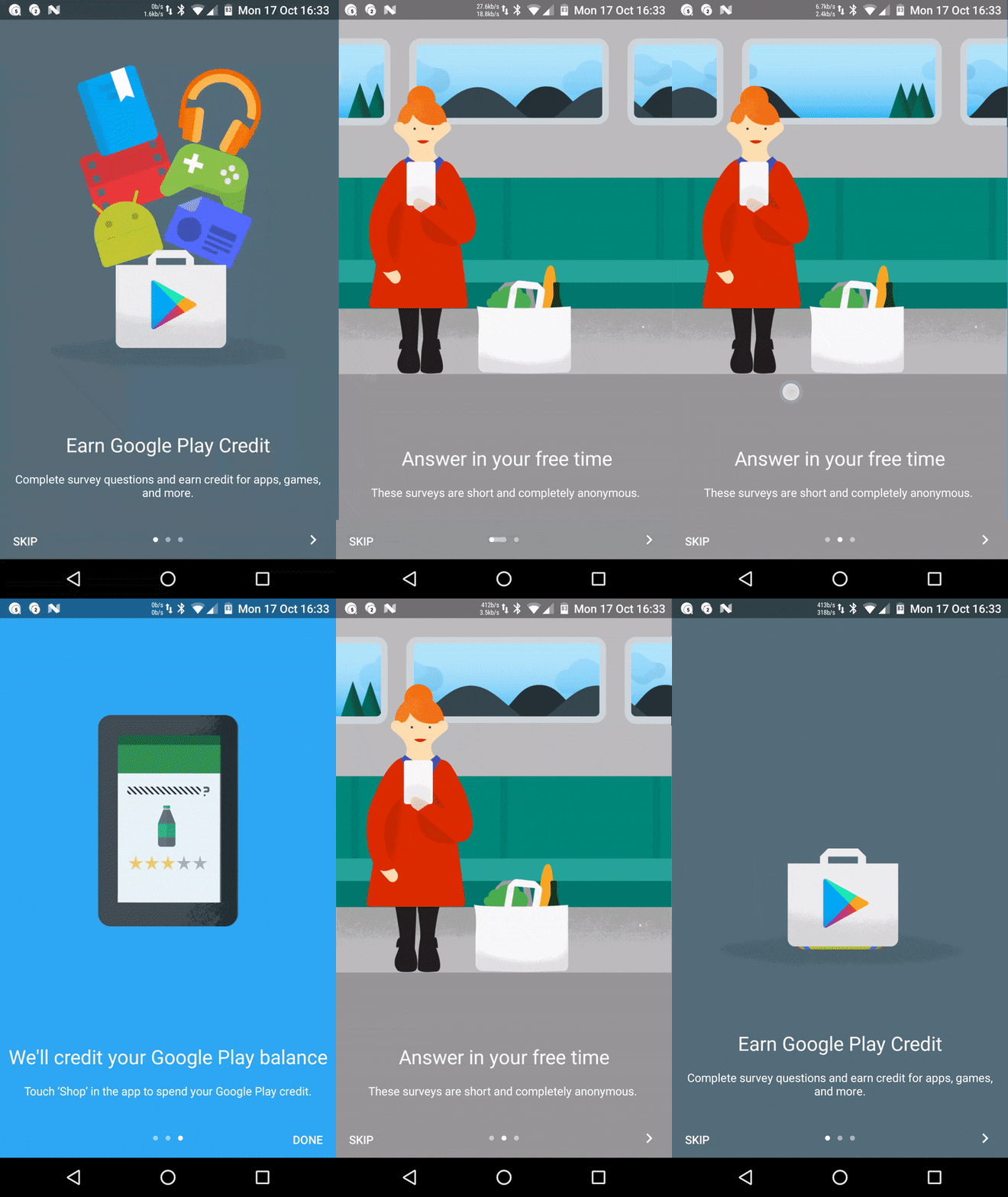
Let’s take a look at what we have here. Here’s the first official example I found from the Google Opinion Rewards app (as of the time of the library’s creation, this was actually the only Google Android app on my phone that was using the indicator, despite its appearance elsewhere; others are using a version that does not animate).

Material ViewPagerIndicator zoomed

Perhaps you’ll agree with me that from our high-level human standpoint, it appears pretty simple. You can already catch a lot more detail than I originally gleaned from blowing up the image, but here’s what I figured out from staring at that the tiny version on my phone for embarassingly long:

  1. The dot for the current page makes a path to the dot for the new page.
  2. The white current page dot slides along the path to its new location.
  3. The path that was created shrinks back under the white current page dot.

Is that all we need to do to replicate this effect? How can we break this down in more detail?

Tool #2: .GIF frame splitting

My first attempt at breaking this down involved sticking an image I found on GitHub through a GIF splitter and looking at each frame in the GIF. I discovered that DavidPacioianu on GitHub extracted the indicator from Nick Butcher’s sample app (the one I mentioned at the beginning) and set it up as a separate library. In the repo README, he helpfully included a GIF of the isolated animation.

(Truthfully, this journey almost ended upon me finding his version, but sometimes you really just need to satisfy your own curiousity and satsify the itch to build something.)

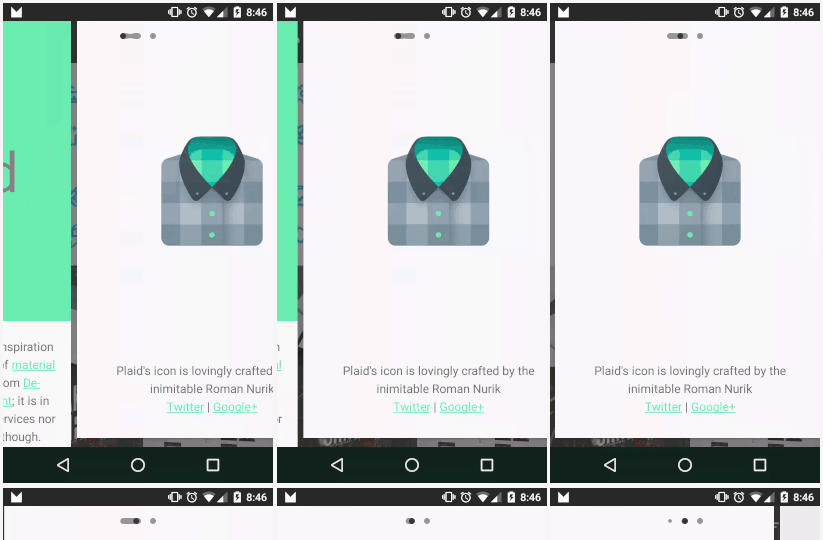
I grabbed the image and ran it through ezgif.com’s GIF splitter. This method, though crude, helped me update my animation analysis with a lot of the details that were too fast for me to catch with just the naked eye:

InkPageIndicator GIF breakdown

  1. Both the dot for the current page and the dot for the new page start stretching out toward each other.
  2. Those two dots form a path.
  3. The current page dot slides across the path to its new location.
  4. The path retreats from the last page dot to the new page dot, taking the old dot for that page with it.
  5. While the path is retreating, a new dot for the last selected page grows out of where the last dot was taken.

Wow! It turns out there was a lot more going on than I had initially thought. After deciding that no, I wouldn’t let the existence of this alternative library deter my learning experience, I now had enough information to get started.

Tool #3: “Animator scale” Developer Setting

While using the GIF splitter helped me get started, I found out while building the library that there’s an even better way to go about this. Specifically, the largest benefit of the GIF breakdown approach is also a huge downside: the breakdown is made up of static images, so it’s very difficult to find out how long each animation takes. (It’s probably possible to calculate if you know the frame rate of the source image, but that’s a bit of a pain.)

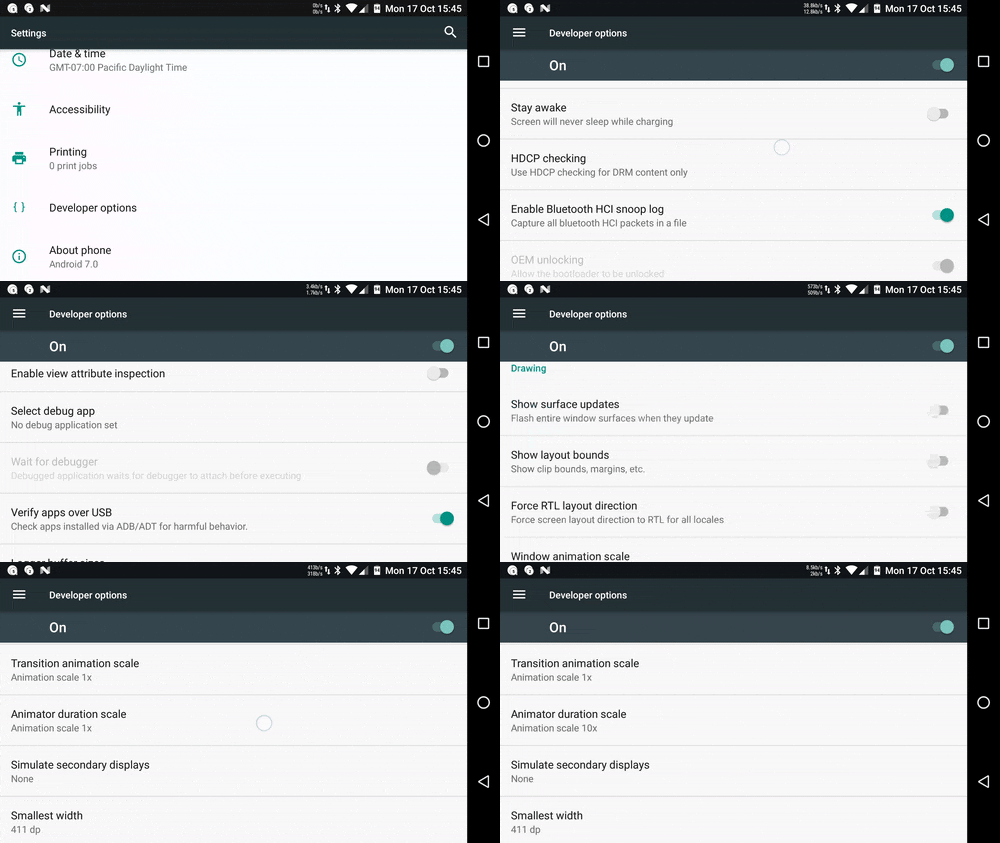
Anyhow, it turns out that you can actually slow down animations globally across your Android device using the Animator scale option in Android’s Developer Settings:

Animator scale developer setting

For the uninitiated, Animator is a core class from the animation framework introduced in Android Honeycomb. It represents an animation “which can be started, ended, and have [listeners].” So, by altering the Animator scale setting, any animation across the entire system that uses Animators to operate will have their natural duration scaled accordingly.

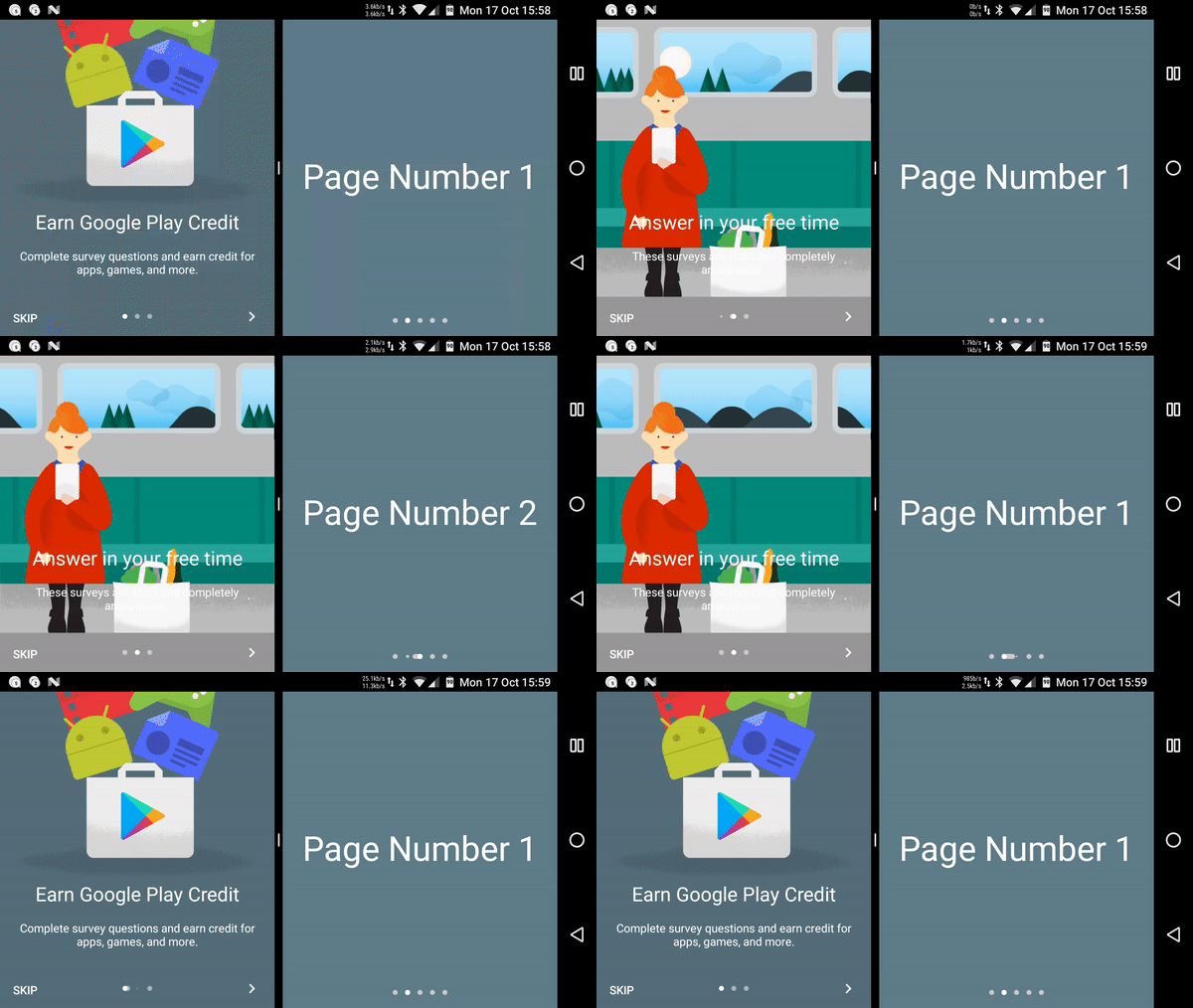
Using this tool, we can now really pick apart the animation we’re seeing. At an Animator scale of 10x, i.e., animations take ten times longer, we can see all the details in a working example of the official widget (source: Google Opinion Rewards app). I’ve used Android Nougat’s multi-window feature to show this side by side with the version I made. Each animation is shown separately because Nougat doesn’t like simultaneous swipes on both apps:

Indicators 10x Side-by-side

Cool, right? This breakdown ended up being really helpful when I was trying to match animation timing for the library (it’s pretty close, and it will get even better as the library develops!), which we will get into in a future post.

Thanks for reading! See you next time.

Kotlin's Computed Properties Are Just Methods

But don't use them to make Observables

Ronald Martin

13 minute read

Bytecode generated in Android Studio

Note: this post assumes familiarity with Java language features and conventions. RxJava familiarity is useful, but not required.

I was curious today about the relationship of Kotlin’s computed properties and methods. They do very similar things, so are they implemented similarly? (Spoiler: Yes. Yes they are.) Somehow, however, I also ended up drawing some conclusions on the semantics of reactive Observable generation. Kotlin’s computed properties can be a powerful tool for expressing your program’s intent with Observables, but you should think twice before using them for that purpose.

Observable methods vs. members

The examples of RxJava usage I’ve seen online generally use factory methods to produce Observables consumed by their subscribers. For example, using Retrofit, we’d define an API call that returns an Observable, and then later we could call this as a method on our generated service.

Observables in Retrofit example

Define a Retrofit API:

public interface GitHubService {
  @GET("users/{user}/repos")
  Observable<List<Repo>> listRepos(@Path("user") String user);
}

Use it while chaining Observables:

Retrofit retrofit = new Retrofit.Builder()
    .baseUrl("https://api.github.com/")
    .addCallAdapterFactory(RxJavaCallAdapterFactory.create())
    .build();
GitHubService service = retrofit.create(GitHubService.class);

service.listRepos("octocat")
    .subscribeOn(Schedulers.io())
    .observeOn(AndroidSchedulers.mainThread())
    .subscribe(repos -> ...)

This is not only very easy to understand, but pretty much the only way to do this because our listRepos() method needs an argument. What if, however, we had some other method that takes no params? Could we then access an Observable as a member on some other object instead of via one of its methods?

It is in fact very possible to do something like this:

A: Observable Member Implementation

public class Stopwatch {
    public final Observable<Long> currentTime = Observable.interval(1, TimeUnit.SECONDS);
}

...
// Using it:
Stopwatch stopwatch = new Stopwatch();
stopwatch.currentTime.subscribe(...);

whereas a more traditional implementation would look like this:

B: Observable Method Implementation

public class Stopwatch {
    public Observable<Long> start() {
    	return Observable.interval(1, TimeUnit.SECONDS);
    }
}

// Using it:
Stopwatch stopwatch = new Stopwatch();
stopwatch.start().subscribe(...);

There are a few things about the previous that I think are worth pointing out:

  1. What if, in either implementation, we had marked the Observable as static? I’ll leave that for you to think about, but honestly I think that there aren’t any startling differences between static/non-static Observables and static/non-static objects of other types.
  2. It’s interesting to note the semantic change between using a field and using a method. I tried to highlight this by naming them differently: currentTime (a noun) versus start(), a verb. Both Observables are doing the same thing, but in the first case, we imply that currentTime is an observable property of a Stopwatch, while in the second it is an operation that can be observed.
    (Giving them the same name felt unnatural to me. I was taught that variable names should be nouns and method names should be verbs, and in fact in this old Sun Java code convention guide it is suggested thus for methods. Interestingly, however, they omit going so far as to suggest similarly giving variables noun names as well. Maybe we can think about this another time.)
  3. In the member implementation (A), the single instance variable currentTime is marked final. I did this in order to provide functional equivalence to the second implementation (B), but are there cases in which an observable member ought to be mutable?
    If the Stopwatch class had some other state precision that controlled the interval’s TimeUnit (instead of the hardcoded TimeUnit.SECONDS), the member currentTime would need to be reassigned to reflect the new value, and thus could not be marked final.
    If the currentTime was no longer final, it would be susceptible to arbitrary reassignment. How can we protect against this? In Java, we would mark it private, and then provide getter access via a getter method, and then… wait. That just results in a modified version of B! Thus, if you know your Observable might need to change, you’re probably better off just using a method.

Kotlin computed properties are functions

Let’s get to what got me curious about in the first place. Say you have a class like Stopwatch that has some state you’d like to observe. Additionally, you aren’t restricted by the need for a parameter like the GitHub username in our very first example. Should you be using the approach A with some observable property, or approach B with methods?

Computed properties…

Kotlin has a number of features that expand what is possible in Java. For the question posed above, I am particularly interested in what I’m going to call a computed property (name taken from the equivalent feature in Swift): a field on an object that does not actually store a value, but instead uses a custom getter (and optionally, a setter) to implement normal property access. Let’s illustrate this with an example:

class Person(
    var firstName: String,   // Standard property with synthesized get-set accessors
    var lastName: String) {  // Another standard property
    
    /**
     * Our computed property! Instead of storing a value, it computes one by calling the
     * getter we implement.
     * This is a read-only computed property defined using `val` instead of `var`.
     */
    val fullName: String
        get() = "$firstName $lastName"
}

Both computed and non-computed properties are accessed the same way:

val person = Person(firstName = "Monica", lastName = "Geller")
person.firstName // "Monica"
person.lastName  // "Geller"
person.fullName  // "Monica Geller"

person.lastName = "Bing"
person.fullName  // "Monica Bing"

Hopefully that makes sense. For another illustrative example, check out the section on computed properties in the Swift Programming Language Guide and its subsequent section on read-only computed properties here. For more on Kotlin properties, check out the appropriate Kotlin page.

…can be used like factory functions

Now, we don’t have to compute our property value from other object properties. Let’s look at a familiar example:

class Stopwatch() {
    val currentTime: Observable<Long> 
        get() = Observable.interval(1, TimeUnit.SECONDS)
}

Yes, it’s our Stopwatch example A from before. Obviously, we can also implement the alternate implementation B in Kotlin as well:

class Stopwatch() {
    // In Kotlin, a function that returns an expression does not need to be 
    // enclosed in braces or explicit use of the `return` keyword.
    fun start(): Observable<Long> = Observable.interval(1, TimeUnit.SECONDS)
}

There is hardly any change to our Java code when it comes to actual usage, too:

val stopwatch = Stopwatch()

// Version A
stopwatch.currentTime.subscribe { ... } // Using Kotlin syntax for trailing lambdas

// Version B
stopwatch.start().subscribe { ... }

…are recalculated on each access

Notably, the read-only computed property approach does not have one of the same issues as the public final field approach in Java. Earlier we noted that if an Observable field depends on some kind of external state, the public final approach is untenable because the field would need reassignment in order to generate a modified Observable. Since a computed property uses its getter to generate a new value each time it is accessed, it is “reassigned” each time it is called.

Let’s look at an example:

class Stopwatch() {
    
    /** Some modifiable state that the Observables depend on */
    var precision = TimeUnit.SECONDS

    // Version A
    val currentTime: Observable<Long> 
        get() = Observable.interval(1, precision)

    // Version B
	fun start(): Observable<Long> = Observable.interval(1, precision)
}

// Usage:
val stopwatch = Stopwatch()

// Both return a subscription to `Observable.interval(1, TimeUnit.SECONDS)`
stopwatch.currentTime.subscribe { ... } // Version A
stopwatch.start().subscribe { ... }     // Version B

stopwatch.precision = TimeUnit.MINUTES

// Now both return subscriptions to `Observable.interval(1, TimeUnit.MINUTES)`
stopwatch.currentTime.subscribe { ... } // Version A
stopwatch.start().subscribe { ... }     // Version B

As you can see, both versions end up producing the same value. Furthermore, A is not subject to arbitrary replacement by some other Observable — it is marked as read-only (val) and cannot be reassigned.

…are in fact just functions?

Intuitively, it makes sense that a read-only computed property is just some syntactic sugar on top of methods. When you look at the property definition, the get() = ... is literally defining a custom getter method to be used for property access. What does its declaration indicate?

val currentTime: Observable<Long> 

We can read that as “if you access me on/give me an object instance, I will give you an Observable<Long>.” In mathematical terminology, a relation that maps an input to an output is called a function.

Are all properties just functions inside? The conspiracy deepens.

…are indeed functions under the hood

Let’s check this out. It’s possible that there’s some subtle difference here that might contribute to our “property vs method” debate. Maybe there is some overhead in using computed properties… or will it be the other way around? This is the question that inspired this post, and we will find the answer!

In all seriousness, it’s pretty easy to find out. I propose a simple test: look at the code generated from each of the property and function implementations and see how both differ.

Example Kotlin class:

import rx.Observable
import java.util.concurrent.TimeUnit

class Stopwatch() {
    
    /** Some modifiable state that the Observables depend on */
    var precision = TimeUnit.SECONDS

    // Version A
    val currentTime: Observable<Long> 
        get() = Observable.interval(1, precision)

    // Version B
	fun start(): Observable<Long> = Observable.interval(1, precision)
}

The Kotlin plugin to IntelliJ provides a nifty feature that lets you look at the Java bytecode generated from any given Kotlin code. You can access this easily by tapping Cmd+Shift+A and typing in “bytecode.”
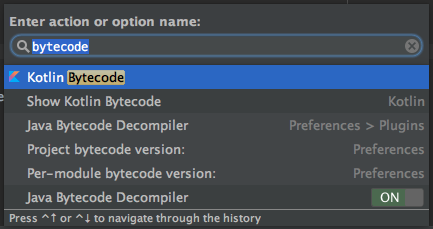
Kotlin Bytecode Viewer

Here is the generated bytecode for our Observables in the class above using Android Studio 2.2-Preview 4 and Kotlin v1.0.2-1:

Stopwatch.kt bytecode for currentTime and start()

  // access flags 0x11
  // signature ()Lrx/Observable<Ljava/lang/Long;>;
  // declaration: rx.Observable<java.lang.Long> getCurrentTime()
  public final getCurrentTime()Lrx/Observable;
  @Lorg/jetbrains/annotations/NotNull;() // invisible
   L0
    LINENUMBER 13 L0
    LCONST_1
    ALOAD 0
    GETFIELD com/itsronald/twenty2020/base/Stopwatch.precision : Ljava/util/concurrent/TimeUnit;
    INVOKESTATIC rx/Observable.interval (JLjava/util/concurrent/TimeUnit;)Lrx/Observable;
    DUP
    LDC "Observable.interval(1, precision)"
    INVOKESTATIC kotlin/jvm/internal/Intrinsics.checkExpressionValueIsNotNull (Ljava/lang/Object;Ljava/lang/String;)V
    ARETURN
   L1
    LOCALVARIABLE this Lcom/itsronald/twenty2020/base/Stopwatch; L0 L1 0
    MAXSTACK = 3
    MAXLOCALS = 1

  // access flags 0x11
  // signature ()Lrx/Observable<Ljava/lang/Long;>;
  // declaration: rx.Observable<java.lang.Long> start()
  public final start()Lrx/Observable;
  @Lorg/jetbrains/annotations/NotNull;() // invisible
   L0
    LINENUMBER 16 L0
    LCONST_1
    ALOAD 0
    GETFIELD com/itsronald/twenty2020/base/Stopwatch.precision : Ljava/util/concurrent/TimeUnit;
    INVOKESTATIC rx/Observable.interval (JLjava/util/concurrent/TimeUnit;)Lrx/Observable;
    DUP
    LDC "Observable.interval(1, precision)"
    INVOKESTATIC kotlin/jvm/internal/Intrinsics.checkExpressionValueIsNotNull (Ljava/lang/Object;Ljava/lang/String;)V
    ARETURN
   L1
    LOCALVARIABLE this Lcom/itsronald/twenty2020/base/Stopwatch; L0 L1 0
    MAXSTACK = 3
    MAXLOCALS = 1

That’s a bit hard to parse, though the bytecode doesn’t look terribly different. Perhaps this will be clearer if we decompile this back into Java using the sweet new Decompile button on top here:
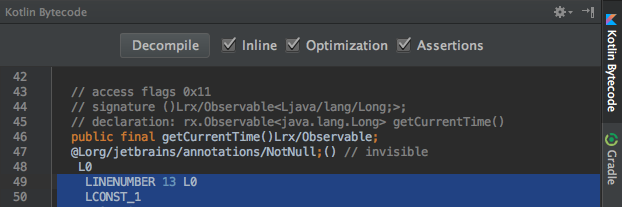
Kotlin Bytecode Viewer

Stopwatch.decompiled.java

import java.util.concurrent.TimeUnit;
import kotlin.Metadata;
import kotlin.jvm.internal.Intrinsics;
import org.jetbrains.annotations.NotNull;
import rx.Observable;

@Metadata(
    // Some generated metadata
)
public final class Stopwatch {
   @NotNull
   private TimeUnit precision;

   @NotNull
   public final TimeUnit getPrecision() {
      return this.precision;
   }

   public final void setPrecision(@NotNull TimeUnit <set-?>) {
      Intrinsics.checkParameterIsNotNull(<set-?>, "<set-?>");
      this.precision = <set-?>;
   }

   @NotNull
   public final Observable getCurrentTime() {
      Observable var10000 = Observable.interval(1L, this.precision);
      Intrinsics.checkExpressionValueIsNotNull(var10000, "Observable.interval(1, precision)");
      return var10000;
   }

   @NotNull
   public final Observable start() {
      Observable var10000 = Observable.interval(1L, this.precision);
      Intrinsics.checkExpressionValueIsNotNull(var10000, "Observable.interval(1, precision)");
      return var10000;
   }

   public Stopwatch() {
      this.precision = TimeUnit.SECONDS;
   }
}

Surprise, surprise. currentTime and start(), and their generated counterparts getCurrentTime() and start(), have exactly equal implementations. They are the same except for their names! While we used a bit of a trivial example, I also went ahead and tried this with some much more complex Observables and ended up with the same result.

Read-only computed properties are just functions under the hood.

So… which way do I use?

Let’s do a quick comparison.

Java

In pure Java, you are almost certainly better off using the method implementation of Observable generation. There is a reason that you fairly exclusively see this practice in examples, and it all comes down to safe usage patterns through encapsulation.

As a reminder, exposing an Observable field on an object:

  1. Allows unsafe assignment unless marked final
  2. Make it unable to adapt to changes to its enclosing object’s other fields if marked final
  3. Can’t take or use arguments.

Methods, on the other hand:

  1. Are immutable
  2. Generate their return values when called and thus react to changes in their enclosing objects’ other fields
  3. Can have arguments.

Kotlin

Kotlin’s property syntax allows a very different style of programming than when only using Java. As we’ve found, using a computed property gives us the power of a getter method with the access pattern of an object field.

With regard to data generation, computed properties:

  1. Do not allow unsafe reassignment
  2. Generate their return values when called and thus react to changes in their enclosing objects’ other fields
  3. Still can’t take arguments.

I submit that perhaps, then, computed properties are a solid alternative to methods for many data types. Certainly they have the capacity to clarify the intent of our programs. If your computed property is just a thin API that provides access to an in-memory field, you should definitely be using it instead of a method.

However…

Observables aren’t simple data types

Most Observable objects are complex and expensive to create. If your computed property instantiates a new Observable every time it’s accessed, using a method better signals that we are building a new object that shouldn’t be used carelessly.

Some Observables have side effects

If the Observable you expose as a property implements doOnNext(), you have now introduced unknown side effects in what is supposed to be a simple data access.

Or, if you have assigned a Scheduler to the Observable, you may have just created a new thread, unbeknownst to the caller! When using a method, there is an implicit understanding that the code body might just do more than accessing a value.

Observables are inherently asynchronous

Asynchronous interactions are notoriously difficult to reason about. The Observable class is meant to ease some of the cognitive load on the programmer, but it still remains that they represent some kind of potential asynchronous value. This leads back to the first point that Observables aren’t simple and that methods better reflect their complexity. In fact, many common Observables represent long running operations, and actions an object takes are better represented as methods.

Note: A good resource I found on this subject is the MSDN guide on “Choosing Between Properties and Methods”.

TL;DR: Kotlin computed properties are just methods, but that doesn’t mean you should be using them to expose your object’s Observable API.

Now it’s time for me to start migrating my computed Observables to straight methods… :-P

8 minute read

Update 2016-10-05

This article has been updated to reflect some changes to tooling that fixes some of the problems mentioned below.

Living Life on the “Edge”

I’m currently building an Android app to remind me to take healthy breaks from starting at computer screens. For extra funsies, it’s built on the cutting edge of current fashionable Android technologies. Of particular note today, we have:

  1. MVP architecture using Dagger 2 for dependency injection, and
  2. Kotlin, the JVM language by JetBrains.

I’ve run into a few roadblocks along the way, and since we’re using shiny new tools, there’s fewer than usual online solutions addressing them. Hopefully these tips might help someone out there who’s doing something similar.

At the time of writing, I’m currently using Dagger v2.2 with Kotlin v1.0.2. I have just discovered that Dagger 2.4 is already stable and that Dagger 2.5 was commited to master a few hours ago, so I’ll update this again when I’ve looked into whether using one of these instead of v2.2 addresses some of the issues that follow.

Update 2016-10-05: I have released the app that inspired this article. You can check it out on GitHub as a reference when setting up your own project.

kapt, the Kotlin annotations processor

Most of the tutorials on (Java) Dagger integrations rely on Hugo Visser’s Android Studio Annotations Processor. This is used with Dagger as follows:

apply plugin: 'com.neenbedankt.android-apt'
 
buildscript {
    repositories {
        jcenter()
    }
    dependencies {
        classpath 'com.neenbedankt.gradle.plugins:android-apt:1.4'
    }
}
 
android {
    ...
}
 
dependencies {
    apt "com.google.dagger:dagger-compiler:$rootProject.ext.daggerVersion"
    compile "com.google.dagger:dagger:$rootProject.ext.daggerVersion"
    provided 'javax.annotation:jsr250-api:1.0' 
    
    ...
}

However, when using these annotations in Kotlin files we should be using the built-in Kotlin annotation processor instead (source: Stack Overflow):

// apply plugin: 'com.neenbedankt.android-apt' - no longer necessary
 
buildscript {
    repositories {
        jcenter()
    }
    dependencies {
        // classpath 'com.neenbedankt.gradle.plugins:android-apt:1.4' - no longer necessary
    }
}
 
android {
    ...
}

kapt {
	generateStubs = true
}
 
dependencies {
    // apt "com.google.dagger:dagger-compiler:$rootProject.ext.daggerVersion" - use kapt instead
    kapt "com.google.dagger:dagger-compiler:$rootProject.ext.daggerVersion"
    compile "com.google.dagger:dagger:$rootProject.ext.daggerVersion"
    provided 'javax.annotation:jsr250-api:1.0' 
    
    ...
}

Multiple JSR 250 Dependencies

That provided 'javax.annotation:jsr250-api:1.0' line might have stuck out to you.

Developers haven’t seemed to have agreed on a source for the JSR-250 Java annotations API used by the Dagger compiler. I’ve encountered at least three Gradle artifacts in various projects:

  1. javax.annotation:javax.annotation-api:1.2 - used in Mosby’s Dagger sample; in Facebook’s Fresco library
  2. org.glassfish:javax.annotation:10.0-b28 - used in Google’s MVP+Dagger example and damianpetla’s Kotlin+Dagger example
  3. javax.annotation:jsr250-api:1.0 - per codepath’s Dagger 2 article

So, what gives? A rudimentary Google search suggests that all of these were implemented as part of Sun/Oracle’s GlassFish project. I didn’t find what I was looking for in jCenter, so I found what I believe are the original uploads on good maven central. This is what I found:

  1. javax.annotation:javax.annotation-api:1.2
  • Description: “Common Annotations for the JavaTM Platform API”
  • URL (from metadata): https://jcp.org/en/jsr/detail?id=250
  • Last updated: 2013
  • Main .jar filesize: 42311 bytes
  • Includes developer in metadata: Rajiv Mordani, the JSR-250 lead at Sun (and now at Oracle).
  1. org.glassfish:javax.annotation:10.0-b28
  • Description: “Common Annotations for the JavaTM Platform API version ${spec.version} Repackaged as OSGi bundle in GlassFish”
  • URL (from metadata): None
  • Last updated: 2011
  • Main .jar filesize: 20542 bytes
  • Includes developer in metadata: No
  • Notes:
    • Manifest includes in header: “Copyright 1997-2008 Sun Microsystems, Inc.”
    • Lists #3 below as an optional dependency!
    • OSGi (official site; Wikipedia) is a standard for packaging Java components.
  1. javax.annotation:jsr250-api:1.0

According to the community page (which is the same URL provided by #1), the original release was in 2006, with maintenance releases in 2009 and 2013 (n.b.: another maintenance release is scheduled for next month, Jul 2016!). So it looks like #1, javax.annotation:javax.annotation-api:1.2 implements the latest version of this spec, whereas #3 implemented the first stable version almost ten years ago.

For what it’s worth, I gave all of them a whirl with Dagger and didn’t run into any issues. This is a good enough comparison for my purposes short of peeking inside the JARs and comparing them. Since #3 is the smallest and seems to contain the bare minimum necessary for Dagger, I’ve taken to using that package.

kotlin-android-extensions

JetBrains’ Kotlin Android Extensions plugin provides some great features on top of the standard tooling. For those who haven’t used it, it can create “synthetic properties” properties from your XML layout files so that you don’t need to make findViewById() calls and cast them to assign your instance variables. These calls are the bane of Android developers everywhere, many of whom use ButterKnife to fight back:

Traditionally in Java:

public class MyActivity extends Activity {

    private TextView mTextView;

    @Override
    public void onCreate(Bundle savedInstanceState) {
        super.onCreate(savedInstanceState);
        setContentView(R.layout.activity_main);
        mTextView = (TextView) findViewById(R.id.textview);

        // Now you can use mTextView:
        mTextView.setText("Hello, reader!");
    }
}

With ButterKnife (Still in Java):

public class MyActivity extends Activity {
    @BindView(R.id.textview) TextView textView;

    @Override
    public void onCreate(Bundle savedInstanceState) {
    	super.onCreate(savedInstanceState);
        setContentView(R.layout.activity_main);
        ButterKnife.bind(this);

        // Now you can use textView:
        textView.setText("Hello, reader!");
    }
}

With kotlin-android-extensions:

import kotlinx.android.synthetic.main.activity_main.* // Import all views in R.layout.activity_main

class MyActivity: Activity() {
	override fun onCreate(savedInstanceState: Bundle) {
		super.onCreate(savedInstanceState)
        setContentView(R.layout.activity_main)

        // textview is already available
        textview.text = "Hello, reader!"
	}
}

Dagger 2.2 Compatibility

Update 2016-10-05: This seemed to be a problem with the Kotlin plugin rather than with Dagger itself. Code minify works fine with Kotlin v1.0.3 and the current version 1.0.4.

Nice, right? However, I couldn’t for the life of me make my view classes work with both Dagger and Kotlin. I started out with an Activity that used Dagger for injecting its presenter. Then, I tried factoring out those pesky findViewById() calls and using the synthetic properties directly, only to run into various build errors. Either the compiler couldn’t import the synthetic layout “Unresolved reference kotlinx,” or component classes generated by Dagger “references unknown class X,” where X is the component interface that Dagger used to generate it. Okay.

This was oft accompanied by the sad error message:

:app:transformClassesWithNewClassShrinkerForDebug FAILED

Error:Execution failed for task ‘:app:transformClassesWithNewClassShrinkerForDebug’.

Warnings found during shrinking, please use -dontwarn or -ignorewarnings to suppress them.

The fix:

buildTypes {
	yourBuildType {
		// ...
		minifyEnabled false
		// ...
	}
}

Voila. No more errors. Hope that gets fixed soon, though.

Misleading solutions

While trying to fix the problem above, Googling pointed me at fairly recent Stack Overflow answers like this one that suggested the following:

  1. Move the buildscript kotlin classpath dependencies to the app module’s build.gradle file
  2. apply plugin: 'kotlin-android-extensions' and add classpath "org.jetbrains.kotlin:kotlin-android-extensions:$kotlin_version" in the gradle file

In fact, the official docs do say you need to apply the kotlin-android-extensions plugin. We should do this. Better safe than sorry, right?

However, I think it’s worth noting that these tips did not fix the conflicts I ran into above with my current setup (Android Studio 2.2-preview3/Dagger 2.2/Kotlin 1.0.2), and that after turning minify off the standard setup (i.e. buildscript in project root build.gradle; no explicit mention of kotlin-android-extensions) everything worked perfectly. Again, this may vary based on what tool versions you are using.

Update 2016-06-15: Using Dagger 2.4 did not solve this problem.

Update 2016-10-05: In Kotlin plugin v1.0.3 and up, the automatic project setup works without modification.

inject() requires the exact class you’re injecting into

Lastly, my “d’oh!” moment.

One of my Activities implemented an interface for interaction with its presenter:

TimerActivity.kt:

class TimerActivity : AppCompatActivity(), TimerContract.TimerView {

	@Inject
	override lateinit var presenter: TimerContract.UserActionsListener
	...
}

TimerPresenter.kt:

class TimerPresenter
	@Inject constructor(override var view: TimerContract.TimerView)
	: TimerContract.UserActionsListener {
	...
}

I wanted to inject the presenter in TimerActivity using Dagger, so I implemented a module and component for it.

TimerComponent.kt:

import dagger.Component

@Component(
        modules = arrayOf(TimerModule::class)
)
interface TimerComponent {

    fun inject(timerView: TimerContract.TimerView)
}

TimerActivity.kt:

class TimerActivity : AppCompatActivity(), TimerContract.TimerView {

	@Inject
	override lateinit var presenter: TimerContract.UserActionsListener
	...

	override fun onCreate(savedInstanceState: Bundle) {
		super.onCreate(savedInstanceState)
		// Inject away!
		DaggerTimerComponent.builder()
			.timerModule(TimerModule(this))
			.build()
			.inject(this)
	}
}

It type-checks and everything! But presenter still wasn’t getting injected. Did you see the problem?

Despite inject() type checking for a TimerActivity that conforms to the TimerContract.TimerView interface, it turns out that the method much match the type of the injecting object exactly.

TimerComponent.kt:

import dagger.Component

@Component(
        modules = arrayOf(TimerModule::class)
)
interface TimerComponent {

//  fun inject(timerView: TimerContract.TimerView) Nope!
    fun inject(timerActivity: TimerActivity)	// Yup!
}

Total noob move, I’m sure, but hey, now I know.

Helpful Resources

I probably wouldn’t have figured out how to make everything work without the help of the following resources — props to the makers:

Update 2016-10-05: I now have my own working Kotlin/Dagger app on GitHub.

Thanks for reading, and catch you next time!